LogoNadou AI Video Generator
  • Create
  • AI Image
  • AI Video
  • Prompts
  • Pricing
Full Public ReleaseNovember 2025

Flux 2 Pro Image Generator

Flux 2 Pro is a top-tier high-fidelity FLUX 2 variant hosted here, engineered for text-to-image creation and reference-driven image editing. It outperforms base variants on visual-first projects where outputs need to be stakeholder-ready immediately after generation, letting you lock in color, material, and layout details using multiple reference inputs in one generation pass.

Loading content...

Your Prompt:

auto

1:1

4:3

3:4

16:9

9:16

3:2

2:3

AI Model:
Output Quality

Loading content...

Example Scene Outputs 1
Click to view full size
Start Generating with Flux 2 Pro

Create high-fidelity images and edits with Flux 2 Pro right here

Begin with a clear creative brief, add reference images to lock in palette or product details, then refine until your output is ready to share with stakeholders.

01

Outline your request as a clear creative direction brief

Be explicit about your core subject, key materials, lighting style, lens feel, and the overall presentation aesthetic you want the output to match.

02

Add references to lock in product, palette, or styling control

Upload up to eight images when different references should define color, materials, silhouette, or styling in the same output.

03

Refine for finish before moving to final export

Adjust your prompt to nail composition and material quality first, then move to the higher-resolution pass once the frame already works.

Key Strengths of Flux 2 Pro

What makes Flux 2 Pro ideal when polished finish is your top priority

Flux 2 Pro is the highest-fidelity variant of the FLUX family hosted here. It is most useful when the image should already feel closer to a polished final direction instead of a flexible middle-ground draft.

Higher polish for luxury product and still-life work

Flux 2 Pro is the ideal choice when the frame should already feel clean, premium, and closer to a presentation-ready product visual.

It delivers great results for fragrance, packaging, and luxury tabletop scenes.
Prioritize it when surface quality and finish matter more than raw generation speed.
Choose it when the image should already feel close to a final stakeholder review direction.

Stronger finish for editorial and campaign fashion

Flux 2 Pro excels when wardrobe, location, and commercial mood need a more polished finish than a standard balanced middle route.

That makes it practical for full fashion campaigns and cleaner editorial concepts.
It holds a consistent higher finish level within this hosted workflow.
Use it when refined output matters more than large volumes of quick iteration.

More premium treatment for interiors and hospitality

It also produces excellent results for boutique interiors, hotel rooms, and design-led spaces that need to read as premium presentation assets.

It is perfect for hospitality concepts and high-finish environment direction work.
Accurate material rendering and lighting polish are core reasons to choose Pro.
This makes it a better route when the room itself is a key part of your premium offering.

Polished direction boards and packaging reviews

Flux 2 Pro is a strong route for packaging and direction boards when the image should already feel cleaner than an exploratory concept sheet.

It supports creation of premium packaging, launch boards, and polished brand review assets.
Outputs feel finished right away while still remaining editable in prompt iterations.
Use it when the concept board itself needs to look presentation-ready for stakeholders.
Top Use Cases

Common projects where Flux 2 Pro excels

Flux 2 Pro is built for outputs that need extra polish, tight creative control, and a campaign-ready finish right from generation.

Premium product still lifes

Ideal for fragrance, skincare, packaging, and tabletop product shots where surface quality, palette control, and intentional composition are all critical.

Fashion and campaign key art

Perfect for editorial-looking campaign frames, look-development images, and concept art that needs a more finished, presentation-ready feel.

Reference-led brand visuals

Bring in several references to ensure product identity, material direction, and brand palette stay consistent through generation or editing.

Higher-resolution creative review assets

Use Flux 2 Pro when your core idea is already finalized, and you want a cleaner route to high-quality review images or campaign drafts.

Prompt patterns and examples

Proven Flux 2 Pro prompt frameworks with working examples

These examples focus on the polished visual use cases where Flux 2 Pro excels: product still lifes, fashion frames, premium interiors, and reference-led packaging direction.

Premium product visual

Excellent prompt alignment

Best for polished still lifes where materials, reflections, and palette control all need to feel premium.

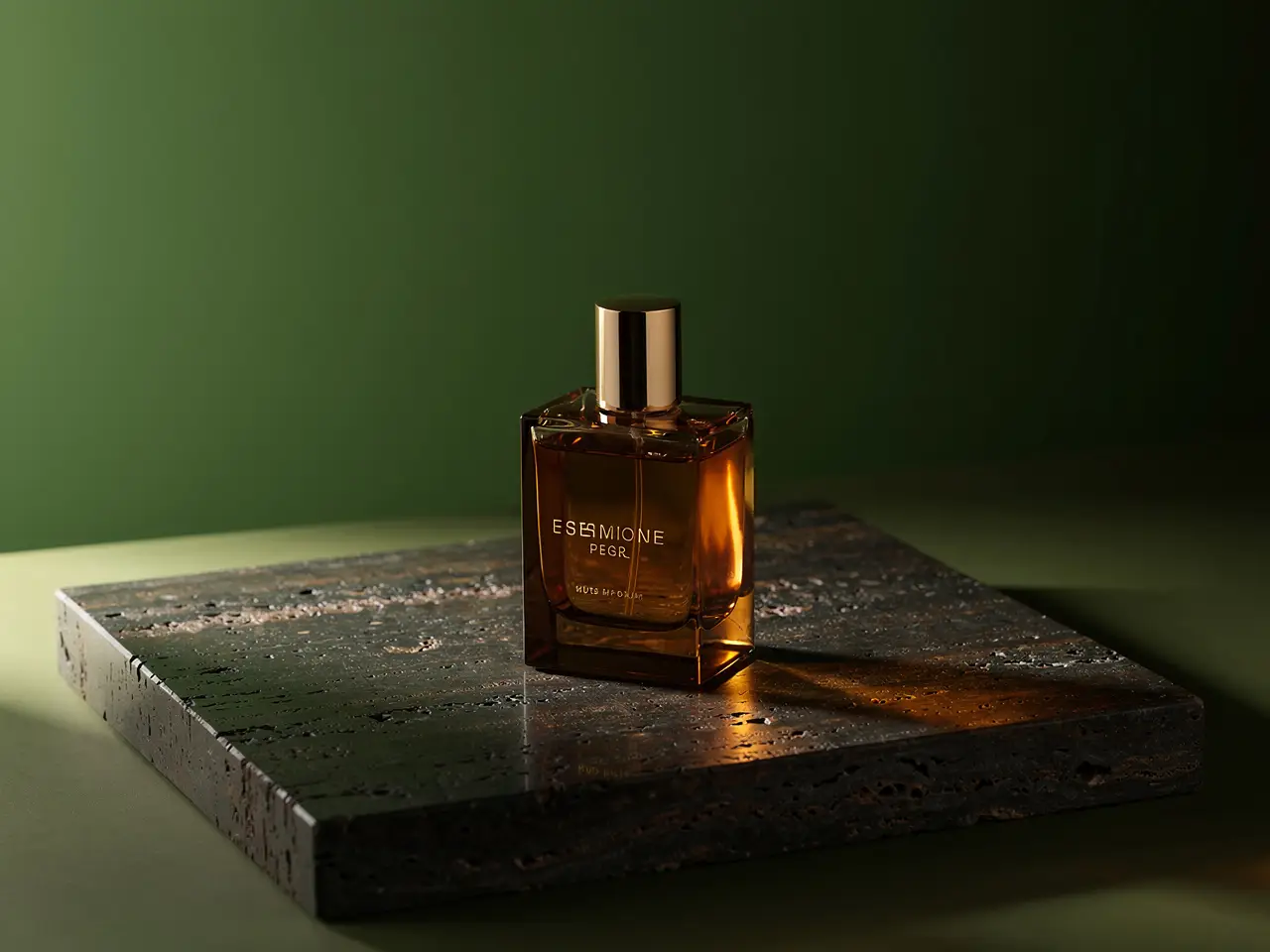
A luxury fragrance still life with precise reflections, premium materials, and a calm muted editorial palette.

Luxury fragrance still life

Prompt composition

[product] + [surface and materials] + [light direction] + [color palette] + [campaign mood]

View full prompt analysisLoad More

Full prompt content

Generate a premium fragrance campaign still life. Show one amber glass bottle on dark travertine with soft side light, controlled reflections, deep moss and bronze accents, and a restrained editorial luxury mood. Leave clean negative space around the bottle, add no extra props beyond subtle warm reflective highlights, and deliver an image ready for a beauty campaign mood board.

Why this example works well

Flux 2 Pro responds better when the prompt names surfaces, light direction, and palette clearly instead of relying on generic luxury keywords.

Desired output outcome

A polished product still life for campaign concepting, launch decks, or brand direction.

Helpful usage tips

  • List surfaces and light direction before adding atmospheric descriptors.
  • Keep the prop list short when the product itself should stay the dominant focus.
Fashion concept

Excellent prompt alignment

Best for fashion frames that need controlled styling, camera distance, and a more finished campaign feel.

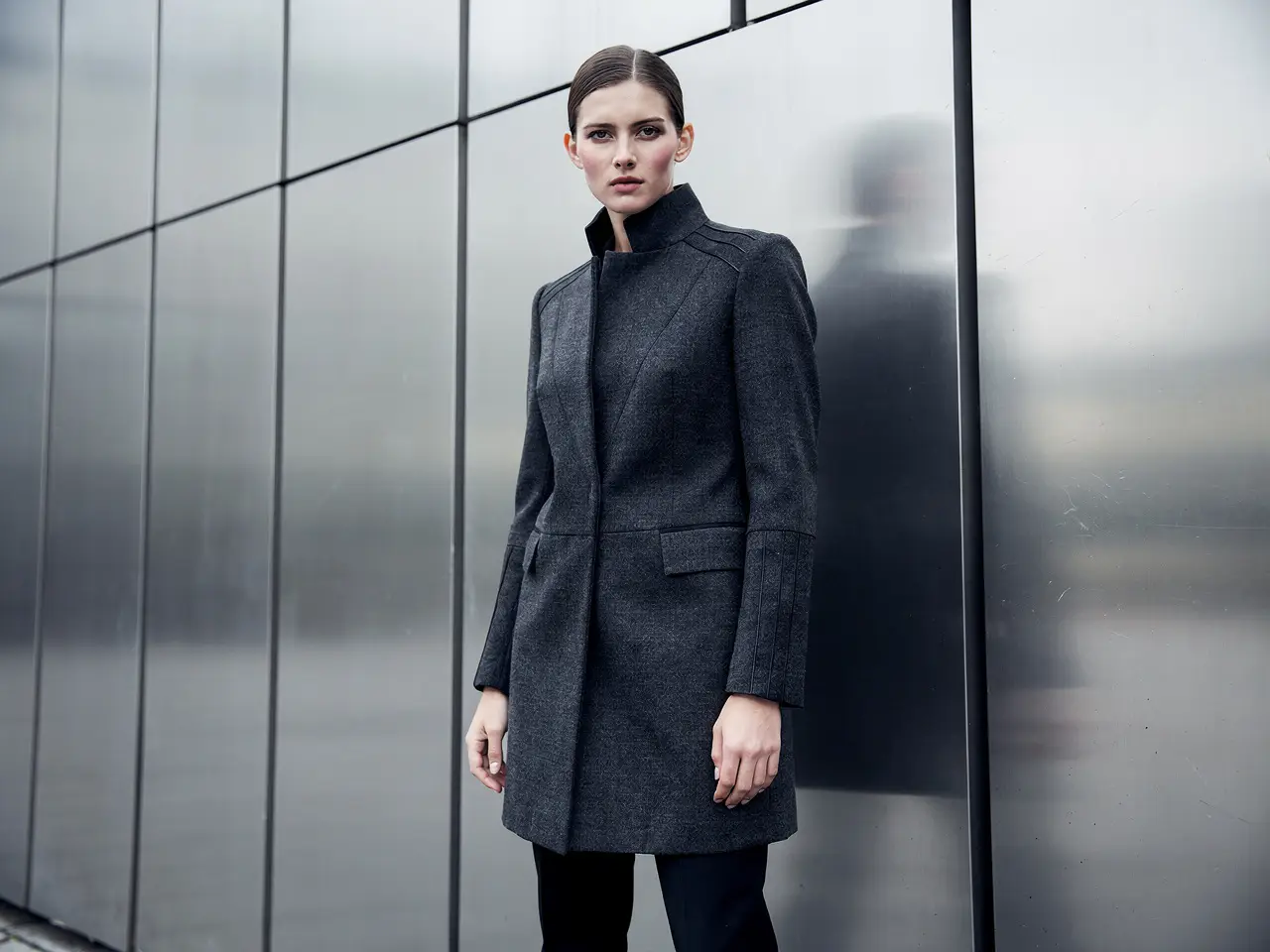
An editorial fashion campaign frame with controlled styling, refined color, and premium soft lighting.

Editorial fashion campaign frame

Prompt composition

[subject] + [wardrobe] + [camera framing] + [location] + [editorial mood]

View full prompt analysisLoad More

Full prompt content

Create an editorial fashion campaign frame of a model in structured charcoal outerwear standing beside brushed metal architecture. Use a medium-full camera distance, overcast daylight, clean shadow transitions, and a premium magazine mood. Keep styling minimal, posture calm, and the output polished enough to work as a brand campaign direction rather than a casual street photo.

Why this example works well

The prompt balances subject, wardrobe, camera framing, and environment, which helps Flux 2 Pro hold composition while keeping the output polished.

Desired output outcome

A finished-looking fashion concept image for campaign development or look direction.

Helpful usage tips

  • State your desired framing directly instead of leaving the final crop to chance.
  • Stick to one clear aesthetic mood instead of mixing multiple conflicting fashion genres.
Interior concept

Excellent prompt alignment

Best for refined interior frames where materials, palette, and atmosphere all need to read cleanly.

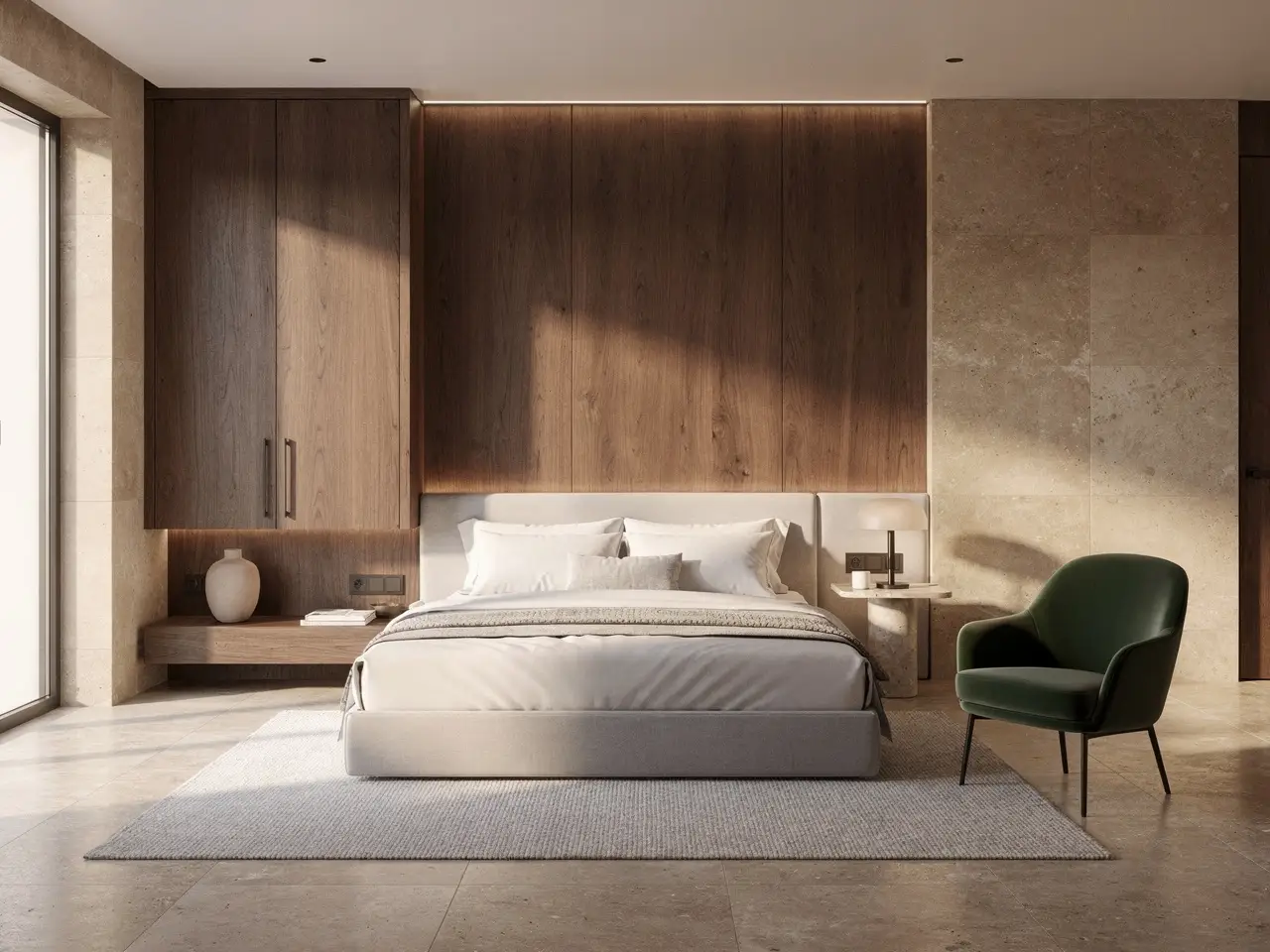
A boutique hotel room concept with warm materials, measured lighting, and a polished hospitality mood.

Boutique hotel room concept

Prompt composition

[room type] + [material palette] + [lighting] + [camera angle] + [hospitality style]

View full prompt analysisLoad More

Full prompt content

Create a boutique hotel room concept with walnut millwork, warm limestone, off-white bedding, and a deep olive accent chair. Use a wide but controlled camera angle from the foot of the bed, soft late-afternoon light, and a quiet premium hospitality mood. The room should feel polished and realistic, like an interior concept prepared for a professional design presentation.

Why this example works well

Flux 2 Pro performs better when the prompt defines materials, palette, and camera angle in one calm, specific request.

Desired output outcome

A polished interior concept for hospitality reviews, brand decks, or architectural mood boards.

Helpful usage tips

  • Name your hero materials so the result does not turn into a generic luxury interior.
  • Keep your camera angle note simple and specific.
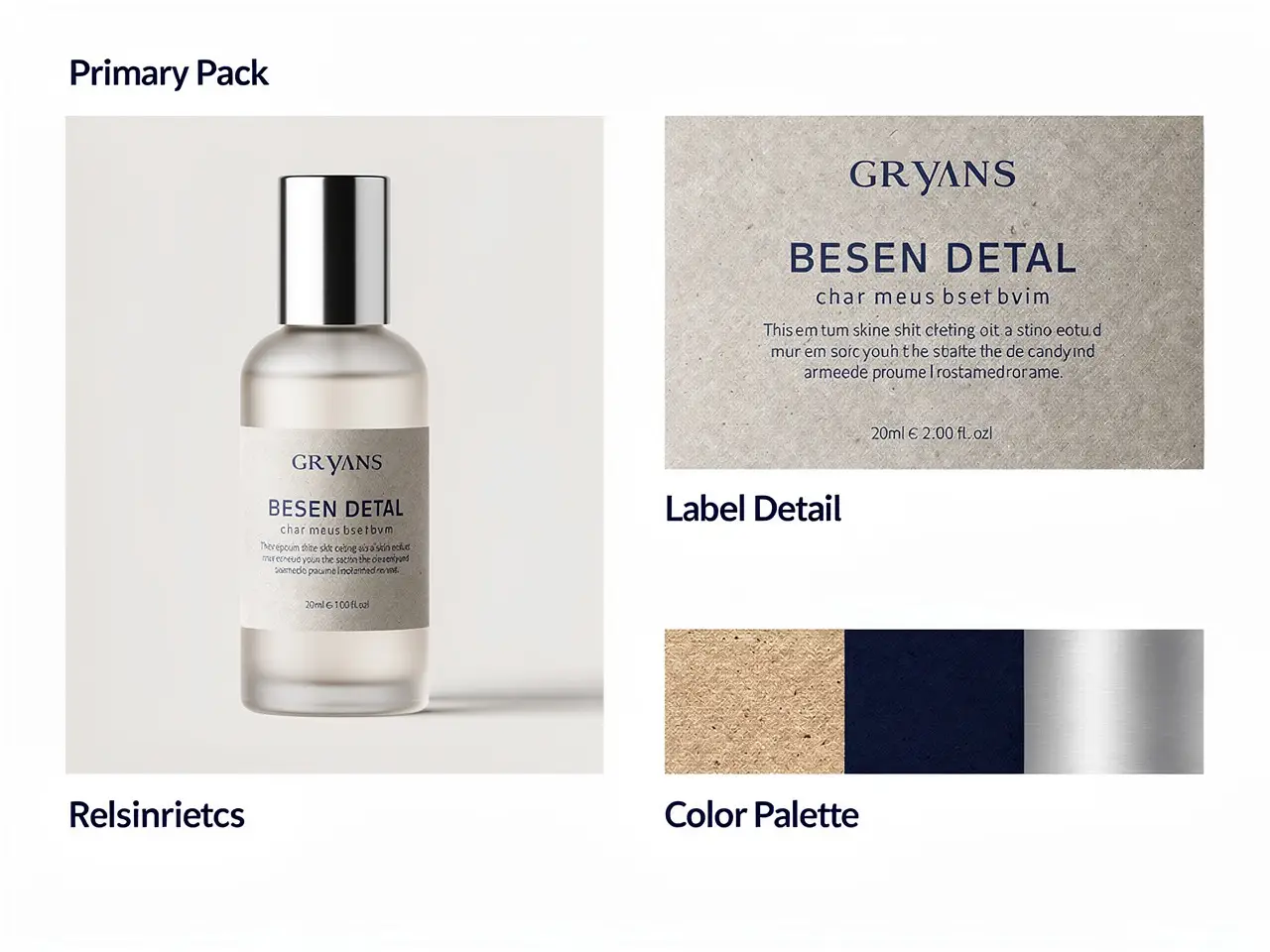
Reference-based edit

Excellent prompt alignment

Best for packaging updates where product identity should stay stable while the label system changes.

A packaging update board showing a stable product silhouette with a cleaner label direction and controlled palette.

Reference-led packaging update

Prompt composition

[what stays] + [what changes] + [label direction] + [palette] + [presentation board]

View full prompt analysisLoad More

Full prompt content

Keep the bottle silhouette and cap proportion from the reference image. Update the label system to matte stone, deep navy type, and a cleaner centered hierarchy. Present the result as a premium packaging review board with one hero bottle, one label close-up, and a small palette strip showing stone, navy, and brushed silver. The image should look like a polished internal brand review asset.

Why this example works well

This prompt tells Flux 2 Pro exactly what stays fixed and what changes, which helps the edit remain fully brand-consistent.

Desired output outcome

A cleaner packaging direction board for design review and launch planning.

Helpful usage tips

  • State what must stay unchanged before describing your new design direction.
  • Assign a clear role to each reference instead of uploading them without context.
When to choose Flux 2 Pro

Choose Flux 2 Pro when finish matters more than raw speed

Flux 2 Pro makes the most sense when your image needs to look more polished before export, especially for product, fashion, and brand visuals where composition and material quality are top priorities.

Choose Flux 2 Pro when the image should already feel presentation-ready

Use it when your brief is visual-first and the output needs stronger polish, cleaner material rendering, and more consistent composition before it leaves the generator.

Use another model when you need a different speed-quality tradeoff

Choose Flux 2 for a more balanced family variant, Flux 2 Klein for faster iteration, Seedream 4.5 for a different high-resolution visual bias, and Z-Image when open self-deployment is a core requirement.

Creator Community Insights

Creator walkthroughs and third-party reviews for Flux 2 Pro

These videos share independent creator perspective on Flux 2 Pro and how it compares to other high-fidelity image models. They add extra supporting context after you've explored the examples above.

Example generated video outputs

Open-source ecosystem

Related open-source projects for Flux 2 Pro

Flux 2 Pro sits in the public FLUX.2 family context, so the most authoritative open-source reference is the core family-level repository and official release material, rather than a separate Pro-only ecosystem page.

Project Repository 01

black-forest-labs / flux2

Official family repository

The official FLUX.2 repository from Black Forest Labs. It is the best family-level reference for understanding how Flux 2 Pro fits into the broader FLUX.2 release and tooling context.

1,105 starred users
Apache-2.0
Visit project page
FAQs

FAQ

About Kling 4 and our platform

What is Flux 2 Pro?

Flux 2 Pro is the highest-fidelity, flagship variant of the FLUX 2 model family available on this page. It was purpose-built for text-to-image creation and reference-guided editing, delivering outputs that are ready for stakeholder review and sharing immediately after generation.

What is Flux 2 Pro best for?

Flux 2 Pro excels at high-end product imagery, core campaign key art, fashion editorial shots, refined still-life concepts, and any image project where a polished finish and intentional, clean composition take priority over fast low-quality iteration.

Does Flux 2 Pro support image input here?

Yes, it does. Flux 2 Pro allows you to upload up to eight reference images per generation here. This capability makes it ideal for product redesigns, look-development boards, and any edit where you need to lock in palette, material, or styling to match your original creative brief.

Which resolutions and aspect ratios does Flux 2 Pro support here?

Flux 2 Pro supports 1K and 2K resolutions here. Supported aspect ratios include 1:1, 4:3, 3:4, 16:9, 9:16, 3:2, 2:3, plus fully automatic framing for custom projects.

How do I write better Flux 2 Pro prompts?

Structure your prompt the same way you would a clear, focused creative brief. Be explicit about your core subject, key materials, camera distance, desired color palette, and the role each reference image plays. Flux 2 Pro performs best with specific, concrete requests rather than prompts overloaded with vague generic style terms.

When should I use Flux 2 Pro instead of Flux 2 or Flux 2 Klein?

Choose Flux 2 Pro any time you need a polished, presentation-ready output before export. Opt for Flux 2 for a more balanced speed-to-quality tradeoff from the same model family, and reach for Flux 2 Klein when you need fast brainstorming iterations more than a final polished finish.

Is Flux 2 Pro good for premium product and fashion visuals?

Without a doubt, yes. Flux 2 Pro is an excellent choice for product and fashion work, delivering cleaner material rendering, more intentional composition, and a polished, campaign-ready finish that works well for commercial projects.

Can I use Flux 2 Pro images commercially?

For commercial production work, you should review Flux 2 Pro outputs the same way you would any other AI-generated asset from a hosted platform. Whether an output is commercially suitable depends on your specific use case, internal content review processes, and the platform terms applicable to your use here.

Still have questions? We're here to help

Join Discord
Related models

Compare Flux 2 Pro with other image models on this site

If Flux 2 Pro isn't the exact fit for your project, compare it with these related options for faster iteration, a lighter family variant, a different visual bias, or open deployment tradeoffs.

Flux 2 Image Generator

Open Flux 2 when you want a more balanced version of the same family instead of prioritizing maximum finish.

Explore full model details

Flux 2 Klein Image Generator

Compare with Flux 2 Klein when speed and lighter-weight iteration matter more than final polish.

Explore full model details

Seedream 4.5 Image Generator

Try Seedream 4.5 when you want a different high-resolution visual route for polished campaign and poster work.

Explore full model details

Nano Banana Pro Image Generator

Compare with Nano Banana Pro when you want another high-fidelity hosted workflow with stronger text-aware structure.

Explore full model details

Try Flux 2 Pro here

Open the generator, start with your visual brief, and add references when you need the output to stay aligned with product, palette, or styling direction.

LogoNadou AI Video Generator

Powered by Kling 4 AI | Fast Video Generation | Professional Quality

TwitterX (Twitter)DiscordEmail
Resources
  • Create
  • Scenes
  • Works
  • Prompts
Company & Legal
  • About
  • Contact
  • Privacy Policy
  • Terms of Service
  • Refund Policy
Image Models
  • Z-Image
  • GPT-4o
  • Flux 2
  • Flux 2 Pro
  • Flux 2 Klein
  • Qwen Image 2
  • Seedream 4.0
  • Seedream 4.5
  • Seedream 5.0
  • Grok Imagine
  • Nano Banana Pro
  • Nano Banana Flash
  • Nano Banana 2
Video Models
  • Google Veo 3.1
  • Google Veo 3.1 Pro
  • Seedance 1.5 Pro
  • Seedance Fast
  • Seedance Quality
  • Seedance 2.0
  • Hailuo 02
  • Kling v2.6
  • Kling v2.5 Turbo
  • Kling v2.1
  • Kling v2.1 Master
  • Kling O1
  • Kling v3.0
  • Kling v3.0 Pro

This website is an independent third-party service built around Nadou workflows. We are not the official website for Nadou, and all product names, model names, and trademarks belong to their respective owners.

© 2026 Nadou AI Video Generator All Rights Reserved.

[email protected]